

OpenBeds® of Florida
Thank you for your interest in utilizing Florida’s statewide behavioral health bed availability navigator sponsored by the Florida Department of Children and Families. Please contact us if you have any questions.
What is OpenBeds?
Behavioral Health Capacity Management and Referral Solution
Behavioral health referrals, typically consisting of multiple calls, faxes or emails, are time-consuming, inefficient and frustrating for both patients and providers.
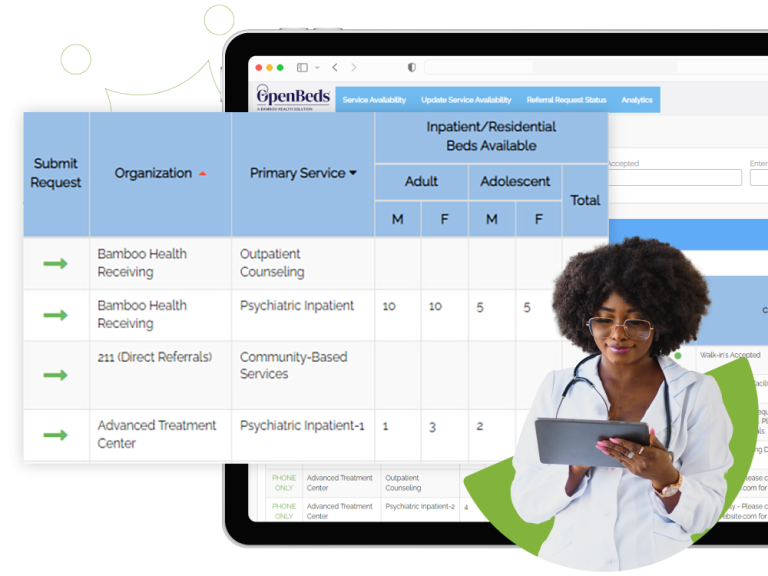
OpenBeds replaces this manual and outdated process for providers by providing one application to refer, share and communicate bed availability. By providing real-time facility availability, two-way digital communication, data analytics and clinical decision support, OpenBeds helps providers get patients the care they need, sooner.
Key Benefits…
- Real-Time Availability Dashboard
- Filterable Treatment Services
Interested in giving feedback to improve our product?
If you are ready to onboard, please complete the following:


Step 1
Once received, we will present your application to the state for approval.
In accordance with HIPAA compliance, a BAA is part of our agreement, as there is the potential for personal health information to be shared. If your organization prefers to use its own BAA please send us a copy for review. We also have a process to review any red lines or proposed changes your organization would like us to consider to the Subscription Agreement.
If you have any questions/edits regarding the agreement, please email [email protected]
No Cost Agreement
Step 2
Please complete this form to create your account within the OpenBeds platform.
For support filling out this form, contact the Florida Onboarding Associate at [email protected].
Configuration Form
Step 3
We offer virtual trainings that you can complete at your own pace or, if preferred you can attend one of our periodic live trainings.
(Virtual training course key: OpenBeds1)
View Trainings
Step 4
Ensure your facility’s services are searchable on Treatment Connection, the public facing site, by following the instructions below.
InstructionsResources and Information

Orientation & Trainings
We offer live & prerecorded orientations and training as a flexible option to ensure your success with OpenBeds.
Virtual Orientation: 3/20 10:30am ET
Learn more about the OpenBeds project background and how it’s helping improve access to behavioral healthcare across Florida.
Register for OrientationOpenBeds Orientation
Learn more about the OpenBeds project background and how it’s helping improve access to behavioral healthcare across Florida.
View RecordingPre-Recorded Training
Learn how to list your services and update your availability within OpenBeds.
View RecordingMicro Tutorials
These videos focus on delivering concise and targeted information on a specific topic, making them ideal for quick learning and on-the-go training.
Searching Services on Network
Swiftly navigate the platform to filter service
options based on certain criteria, determine
availability and program details and more.

Updating Service Availability
Perform key steps to accurately reflect bed
and appointment availability for your listed services.

Editing User Accounts
Effectively manage user accounts
and access within our system.
*Feature available to Administrator
users only

Setting Availability Update Reminders
Set up reoccurring email alerts to remind you to update your service availability.

Editing Service Details
Accurately update and manage service details within our platform.
*Feature available to Administrator users only

Updating Service Availability
Perform key steps to accurately reflect bed
and appointment availability for your listed services.

Want More Information?
Click the button below to view our most frequently asked questions and/or submit a support ticket.
More Info!