

BH SCAN
Thank you for your interest in utilizing BH SCAN, the behavioral health statewide central availability navigator sponsored by the North Carolina Department of Health & Human Services. Please reach out to us if you have any questions.
What is BH SCAN?
Behavioral Health Statewide Central Availability Navigator
Behavioral health referrals, typically consisting of multiple calls, faxes or emails, are time-consuming, inefficient and frustrating for both patients and providers.
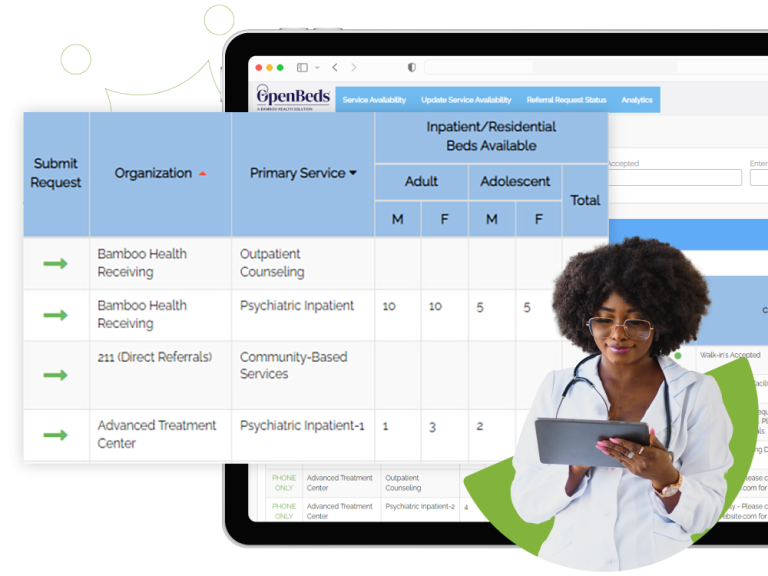
BH SCAN replaces this manual process for providers by increasing transparency into open resources in the state through a platform to view treatment availability. By providing real-time facility availability, BH SCAN helps providers get individuals the care they need, sooner.
Key Benefits…
- Real-Time Availability Dashboard
- Filterable Treatment Services
- Quick Access to Service Details and Requirements
Interested in giving feedback to improve our product?
If you are ready to onboard, please complete the following:


Step 1
Once received, we will present your application to the state for approval.
In accordance with HIPAA compliance, a BAA is part of our agreement, as there is the likelihood that personal health information will be included in the referral. If your organization prefers to use its own BAA please send us a copy for review. We also have a process to review any red lines or proposed changes your organization would like us to consider to the Subscription Agreement.
If you have any questions/edits regarding the agreement, please email [email protected]
No Cost Agreement
Step 2
Please complete this form to create your account within the BH SCAN platform.
For support filling out this form, contact the BH SCAN Onboarding Associate at [email protected].
Configuration Form
Step 3
We offer virtual trainings that you can complete at your own pace or, if preferred you can attend one of our periodic live trainings.
View Trainings
Digital Referrals

Digital referrals streamline the process of connecting individuals to treatment by letting care teams send referrals to providers through BH SCAN, saving valuable time for teams and enhancing care coordination across the network.
Features Available When Enabling:
- Easy-to-use digital intake form
- Organize requests in Referral Request Status tab
- Secure in-platform messaging between care teams
- Relay status updates via notifications

Enhance your organization’s ability to connect individuals with the right care quickly and efficiently. By signing up to send and/or receive digital referrals, you’ll streamline workflows, reduce administrative burden, and improve care coordination across providers. Gain access to a digital referral network, track request statuses, and ensure timely placements—all within a secure, user-friendly platform.
Interested in enabling this feature for some/all of your teams?
Submit the Form
To learn more about the digital referral workflow, view our full-length training or mini-tutorials.
View Trainings
Resources and Information

Orientation & Trainings
We offer prerecorded orientations and trainings as a flexible option to ensure your success with BH SCAN.
BH SCAN Expansion Orientation
Learn more about the BH SCAN project background and the deadlines for the upcoming expansion go-live.
View RecordingBH SCAN Provider Training
Learn how to search for treatment availability, send digital referrals, and close the loop on these requests, leading to a streamlined referral process all in one platform.
View RecordingMicro Tutorials
These videos focus on delivering concise and targeted information on a specific topic, making them ideal for quick learning and on-the-go training.
Searching Services on Network
Swiftly navigate the platform to filter service
options based on certain criteria, determine
availability and program details and more.

Messaging within the Platform
Ask questions, send documents and more
within a referral request using our secure
digital messaging feature.

Updating Service Availability
Perform key steps to accurately reflect bed
and appointment availability for your listed services.

Editing User Accounts
Effectively manage user accounts
and access within our system.
*Feature available to Administrator
users only

Sending a Referral Request
Become proficient in the digital referral workflow and ensure optimal care coordination.

Responding to Referral Requests
Efficiently close out referrals by documenting a final decision ensuring a seamless transition of care.

Setting Availability Update Reminders
Set up reoccurring email alerts to remind you to update your service availability.

Editing Service Details
Accurately update and manage service details within our platform.
*Feature available to Administrator users only

Integration Options

Single Sign-On Enhancement Enablement
Single sign-on (SSO) is an identification method that enables users to log in to multiple applications and websites with one set of credentials. SSO streamlines the authentication process for users.
SSO Request Requirements
- Your organization has an active account within the OpenBeds platform.
- Your IT department has an Active Directory or an equivalent LDAP system in place that supports SAML 2.0.
- Your IT department has reviewed the SSO Configuration and Enablement Documentation and confirmed feasibility.

Automated Bed Availability
Automated Bed Availability allows healthcare facilities to send real-time bed counts via automation and surface total bed availability within the BH SCAN web application. When Automated Bed Availability is configured, users will no longer need to manually update bed availability for their services.
Pilot Phase 1 – Complete
Nine UNC Health facilities leveraged JavaScript Object Notation (JSON) post to receive bed counts and surface total bed availability within the BH SCAN application every hour. As a result, daily bed updates increased by 1362%.
Learn more at Pilot Phase 1 Report
To determine if your organization is ready to begin this process, please review this ABA documentation. This document outlines the critical data values needed and how to share bed availability data with Bamboo Health.
Demo
Electronic Health Record (EHR) Workflow Integration
The goal of EHR workflow integration is to use SMART on FHIR API to create integration between the OpenBeds referral platform and the referring facility/provider EHR system for the purpose of making electronic referrals within a providers’ workflow. This will provide one-click access to OpenBeds and leverage information from the EHR to pre-populate the following patient demographics in the referral form:
- First name
- Last name
- Date of birth
- Phone number
EHR integration improves security, increases time savings, and creates a more seamless transition between EHR and OpenBeds systems.
DemoWant More Information?
Click the button below to view our most frequently asked questions and/or submit a support ticket.
More Info!